Per product, automatically
The plugin generates ready-made questions and answers per product via AI - the typical questions customers ask before buying, already answered on the detail page.
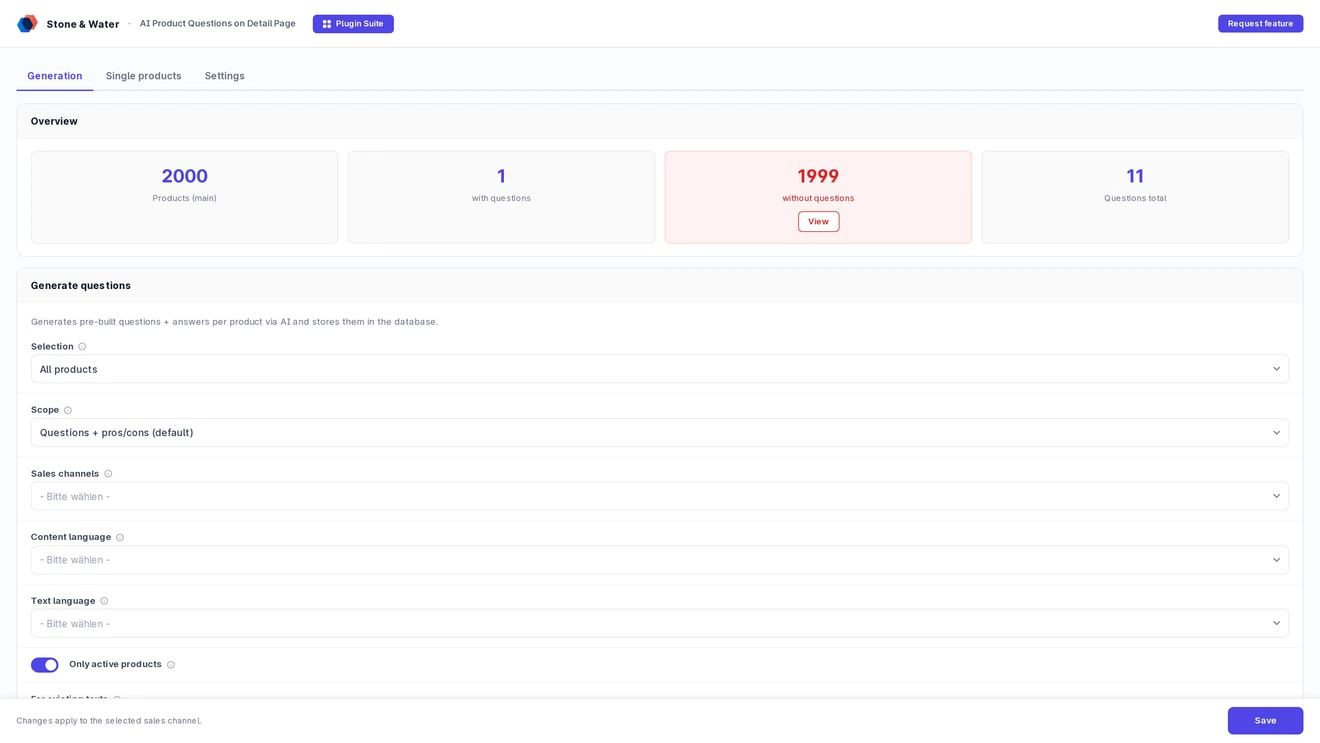
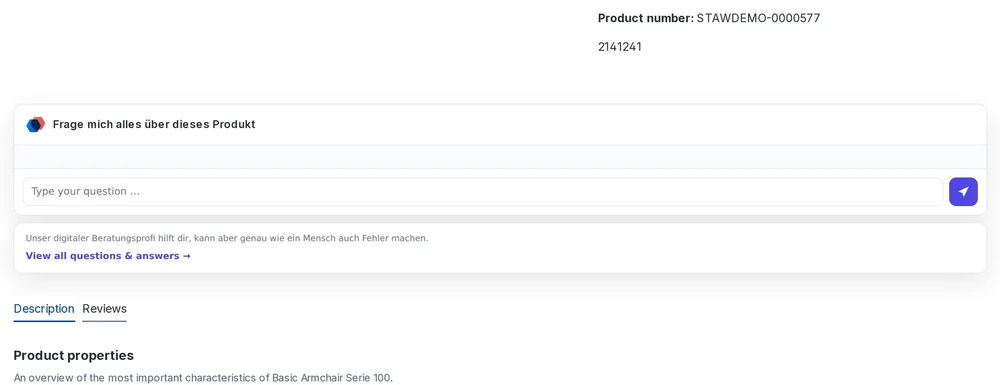
Generates typical questions and answers per product via AI and shows them as a chat or FAQ on the detail page - stored in the Shopware DB.
A short look, recorded right in Shopware.
The plugin generates typical customer questions and answers per product via AI and shows them as a chat or FAQ on the detail page - stored in the Shopware DB, without a live API call on page load.
The plugin generates ready-made questions and answers per product via AI - the typical questions customers ask before buying, already answered on the detail page.
Display as an interactive question chat or as an expandable FAQ list (without input field). Freely selectable per sales channel.
Above the chat and FAQ you can show product name, article number, manufacturer, availability and price as compact chips - selectable per sales channel. Without a selection the area stays empty.
When a customer picks a colour or size, those options are passed to the AI as context. If a variant has no description of its own, it inherits the one from the main product - so answers fit even with thinly maintained variants.
On request all questions for an article also appear as a separate indexable page - with FAQ markup, pros and cons, its own page title and a link back. The widget links to it.
The address of the FAQ subpage follows the product ID, the article name, the article number or both. Umlauts and special characters are transliterated cleanly, and links already shared keep working after a change.
In addition to the questions, the AI generates a pros/cons block - the advantages and disadvantages at a glance, good for the purchase decision.
On request the questions are marked up as an FAQPage, including the addresses of individual questions. Search engines can then present them directly in the results.
Products mentioned in the answers are linked to their product page - cross-selling partners as well as articles from the same manufacturer. That strengthens internal structure without manual work.
Sales channels and languages are multi-selects. The run processes every combination one after another, using the settings of each channel. Without a selection the general configuration applies.
Freely selectable with your own API key and model, including a connection test directly in the backend.
Generation takes customer reviews as well as similar and cross-selling products into account - the answers fit the real assortment.
Questions and answers are stored in the Shopware database - no live API call on page load, full performance and cache compatibility.
Pre-generated product questions lower the purchase hurdle, relieve support and provide SEO-relevant content along the way.
Many purchase drop-offs are caused by open questions the customer cannot get answered - and for which they will not contact support. Pre-generated questions and answers directly on the product page remove this hurdle: the customer sees the typical answers immediately, without waiting or searching.
When the most common questions are already answered, the customer is less likely to drop off to "research first".
Standard questions are answered on the page - reducing recurring support requests about the same products.
The generated Q&As provide additional, relevant content on the product page - good for discoverability.
From provider choice via generation mode to display - all configurable in the admin, per sales channel. No code changes required.
Batch generation - for all products, from a creation date, by manufacturer or specifically for a product stream. With parallel processing.
Switchable between interactive chat and expandable FAQ list. Option "hide chat without questions" for products without generated questions.
Position, number of questions, heading, avatar and hint text can be set per sales channel.
Administrative access is bound to dedicated permissions, separated into viewing and editing. Free-text input in the shop is explicitly off until you enable it, and rate limited per sender.
Optionally the customer can also ask their own questions - or the display stays limited to the pre-generated Q&As.
The bulk run and targeted generation live in separate tabs. The search finds products by name and article number, variants included - a chosen variant is resolved to its parent product.
Find individual products by name or article number and regenerate their texts - several at once if needed. The selection appears as chips and is processed in batches, with a summary at the end.
For a single generation you can pass an extra instruction - a content focus or a different tone, for example. It applies to that run only; your permanent prompt stays untouched.
Pros and cons can be regenerated on their own without touching the existing questions. That protects already indexed content and saves cost with the AI provider.
Generation follows the selected channel too: AI provider, language, number of questions, question style and product details are taken from there rather than from the general configuration.
The run shows the planned scope in a window, the current pass with channel and language, a bar and counters for processed and skipped articles. Errors stay in plain words until you close it.
With a sales channel selected, a note shows how many settings deviate from the general configuration - along with a button to reset them to the general values.
The "test connection" button checks API key and model - even entered, not-yet-saved values.
Content is produced per shop language: product data is loaded translated, the AI writes in the target language, and the entries are stored under that language. The storefront automatically serves the texts of the active language.
Batch generation, storage in the DB, storefront widget on the detail page - no live API call on page load, full cache compatibility.
The QuestionGenerator creates questions, answers and the pros/cons block in batches with parallel processing - across all products, from date, by manufacturer or per product stream.
The AiClient supports OpenAI, Anthropic, Mistral and Google Gemini. The API key is found across scopes (global or per sales channel), with a connection test.
Questions and answers are stored in the Shopware database - no live API call on page load, full cache compatibility.
Dedicated storefront component on the product detail page, either as chat or FAQ. Position configurable per sales channel.
Generation takes customer reviews as well as similar and cross-selling products into account for fitting answers.
Available in the official Shopware Store - with auto-update notifications in the admin.
How the questions are produced, what they do for SEO and what it costs.
The plugin produces fitting questions and answers per article from the existing product data. You choose provider, language, count and question style, then generation runs as a bulk job or for individual products.
On request every article gets its own indexable FAQ subpage with a speaking address, plus FAQ markup, individual addresses per question and internal links to mentioned products. The SEO question style phrases questions as fully worded search queries.
Buying directly costs 19.99 euros net per month or 203.90 euros net per year. On top come your AI provider costs. All prices are net and exclude VAT.
In your Shopware database. There is no external system and no ongoing connection: once generated, the questions keep working even without AI access.
Yes. When a customer picks a colour or size, those options are passed to the model as context. If a variant has no description of its own, it inherits the one from the main product.
Yes. The scope selector and a dedicated button let you regenerate only the assessment without touching the existing questions. That protects already indexed content and saves provider cost.
Reviews from merchants in the Shopware Store. Functionality 5.0 · Usability 5.0 · Documentation 5.0 · Support 5.0. The texts are quoted verbatim, in German, from the store: See all reviews in the Shopware Store.
Two routes, the same feature set - pick whichever suits your setup.
All prices net, plus VAT.
Download the free Plugin Suite and upload it in the admin, no SSH needed. It installs and updates the plugin with one click. You buy the licence directly from us, with an invoice from us and support straight from the developer.
Listed in the official Shopware Community Store. Installation and updates run through the plugin manager, billing through your Shopware account. Store conditions differ from ours.